Zoho Mail is widely used by businesses for professional email communication. Because of its popularity, cybercriminals often misuse the Zoho brand name to send fake emails and steal user information.
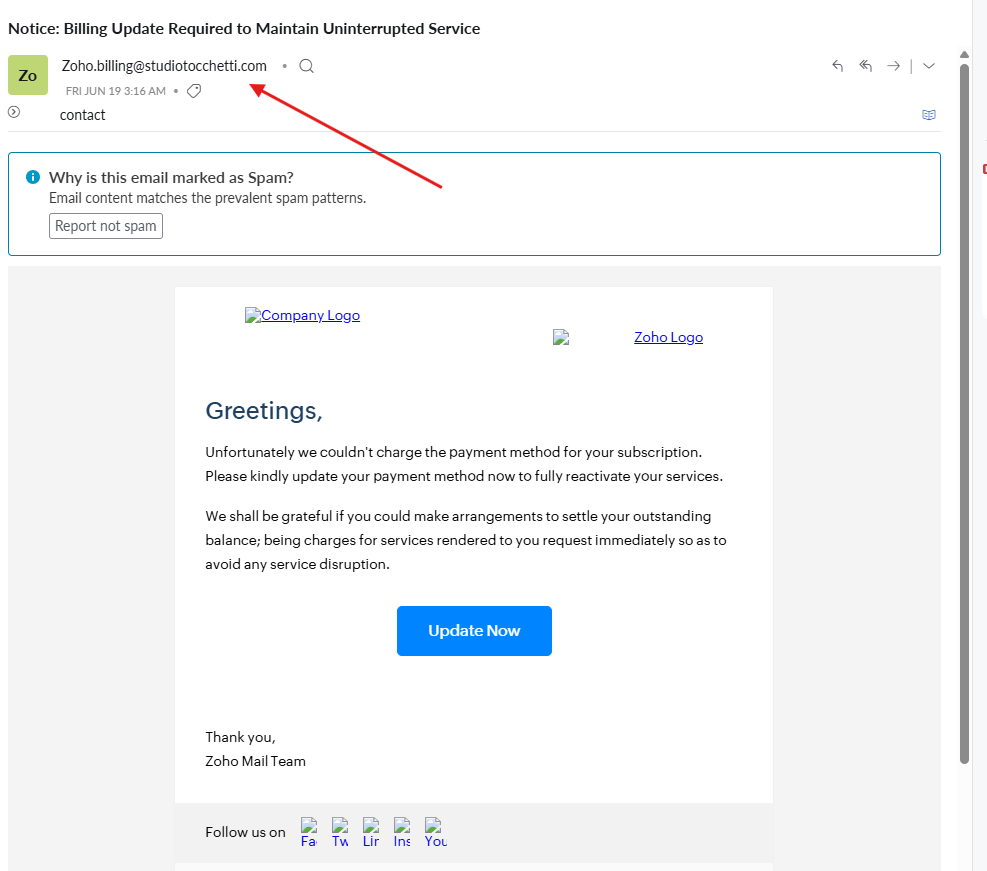
Recently, a suspicious email was found targeting Zoho Mail users with the subject:
“Notice: Billing Update Required to Maintain Uninterrupted Service”
The email claimed that the payment method could not be charged and asked the user to click an “Update Now” button to reactivate the service.
This type of message is a phishing email. It is designed to look like an official Zoho Mail billing notice, but the real purpose is to steal login details, payment information, or business email access.
Why This Email Is Fake
The biggest warning sign is the sender email address:
Zoho.billing@studiolocchetti.com
This is not an official Zoho domain.
A real Zoho email should come from a verified Zoho domain, not from a random third-party domain. Even if the email uses Zoho’s logo, design, or professional language, the sender address clearly shows that this message is suspicious.
Common Signs of a Zoho Mail Phishing Email
A fake Zoho Mail email may include:
- A billing update warning
- An account suspension notice
- A fake payment failure message
- An urgent “Update Now” or “Verify Account” button
- A sender address that is not from Zoho
- Broken logos or poorly loaded images
- A link that redirects to a phishing website
Cybercriminals use fear and urgency to make users click quickly without checking the details.
What Could Happen If You Click the Link?
If you click a phishing link and enter your details, attackers may steal:
- Zoho Mail login credentials
- Business email access
- Payment or card information
- OTP or two-factor authentication codes
- Sensitive company communication
Once attackers gain access to a business email account, they may send spam, impersonate your company, access private messages, or attempt financial fraud.
What Should Zoho Mail Users Do?
If you receive this type of email, do not click any link or button.
Instead:
- Check the sender email address carefully
- Do not enter your password on any unknown website
- Visit Zoho Mail directly from your browser
- Report the email as spam or phishing
- Enable two-factor authentication for extra security
- Contact your email service provider if you are unsure
How to Stay Safe from Zoho Phishing Emails
To protect your business email, always follow basic email security practices:
- Use a strong and unique password
- Enable MFA or two-factor authentication
- Avoid clicking billing links from emails
- Check the domain before entering login details
- Train your team to identify phishing emails
- Configure SPF, DKIM, and DMARC properly
- Use a trusted Zoho Mail partner for setup and support
Get Zoho Mail in Bangladesh from a Trusted Partner
If you are using Zoho Mail for your business, proper setup and security configuration are important. A trusted partner can help you configure Zoho Mail correctly and reduce risks related to spam, spoofing, and phishing.
CORNQ provides Zoho Mail service, setup, and support for businesses in Bangladesh.
Click here to Get Zoho Mail service from CORNQ.
Final Words
Phishing emails are becoming more realistic every day. A fake email may look professional, use official logos, and create urgency, but the sender address and link destination often reveal the truth.
Before clicking any billing or account update link, always verify the sender first.
Stay alert. Protect your business email.
0 Comments